



Ready to tap into Australia’s thriving eCommerce scene? Selling on eBay gives you access to over 132 million active buyers worldwide, 12 million of which are in Australia, offering a trusted platform where almost any product can thrive. Want to know how to use eBay to sell products effectively? Whether you’re clearing out clutter or launching a full-scale business, eBay offers endless opportunities. With tools like M2E Pro, you can simplify listings, manage inventory, and sync orders effortlessly—taking your eBay selling game to the next level!
eBay Marketplace in Australia: General Overview
Explore the platform’s features and learn how to easily sell an item on eBay.

Who Can Sell on eBay in Australia?
eBay caters to all sellers, whether you’re clearing out clutter for extra cash or building a full-scale business. An individual account works well for hobbyists, but serious sellers should consider an eBay Store. As a professional seller, you’ll enjoy perks like reduced fees, advanced tools, and a customizable storefront to draw in buyers. It’s an innovative, cost-effective way to elevate eBay sales and grow your business.


What Products Can You Sell on eBay?
What and how do you sell on eBay? eBay is a versatile marketplace where you can sell nearly anything, from niche items to everyday essentials. It caters to diverse audiences with categories spanning fashion, car accessories, electronics, and home improvement tools. Whether you’re offering toys, beauty products, or rare collectibles, eBay provides a platform for all types of sellers to connect with a global customer base.
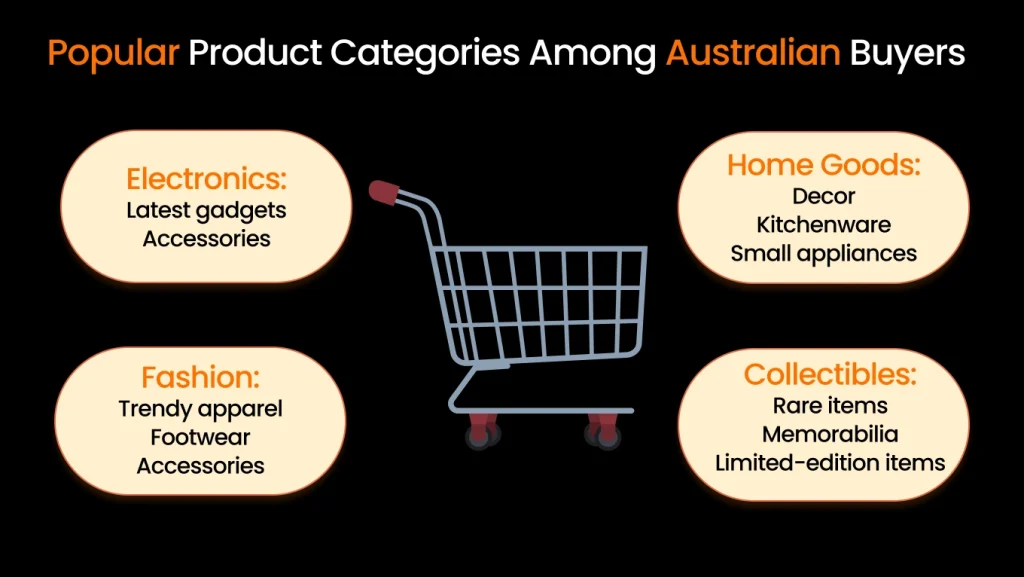
What items are the most popular among Australian buyers? Australians often seek unique or niche products that are not readily available locally. The most popular categories are electronics, the latest gadgets and accessories, and home goods, including decor, kitchenware, and small appliances. Fashion also stands out, with Australian shoppers seeking trendy apparel, footwear, and accessories from international brands. Additionally, collectibles hold a strong appeal, including rare items, memorabilia, and limited-edition products. These categories reflect the Australian market’s demand for quality, uniqueness, and variety.
However, while eBay embraces variety, strict rules exist on what you can and cannot sell. Prohibited items include:
- Alcohol and Drugs: Controlled substances and paraphernalia are banned.
- Wildlife Products: Items from endangered species, like ivory, are prohibited.
- Perishable Foods: Items needing specific storage aren’t allowed.
- Adult Content: Restrictions apply to explicit materials.
- Firearms: Guns, ammo, and parts are not permitted.
- Used Cosmetics: Pre-owned beauty items are banned for hygiene reasons.
- Gift Cards: Most gift and prepaid cards are restricted.
- Cultural Artifacts: Protected historical items are off-limits.
These restrictions won’t pose a problem for most sellers, but it’s crucial to familiarize yourself with eBay’s prohibited items policy.
Remember that, beyond eBay, each country restricts what can be sold.
In Australia, certain products must comply with local laws and standards, such as electrical safety regulations or the Australian Consumer Law (ACL). Sellers also need to follow Australian customs rules—items like weapons, hazardous materials, and certain plants or animal products are strictly restricted or prohibited.
Always research and confirm that your products can be legally imported into Australia to avoid issues.
Understanding eBay Australia Fees
When selling on eBay, it’s important to understand the various fees involved, as these can impact your overall profitability. Here are the four main fee types you’ll encounter:
| Seller Type | Listing Fees | Fixed Fee (per order) | Variable Fee | Store Subscription Fees |
| Individual Sellers | Free (many categories) | $0.30 | – 13.4% on sales up to $4,000- 2.5% on sales over $4,000Services: Fixed final fee of $44 per service | N/A |
| Business Sellers | Subscription reduces fees | $0.33 | Basic Store: 7.3%–11.9% | $27.45/month (Basic Store) |
| (eBay Store) | Featured Store: 6.6%–10.7%Anchor Store: 6.2%–10.1% | $82.45/month (Featured Store)$604.95/month (Anchor Store) |
Key Fee Categories
- Subscription Fees: These are required for eBay Store plans, which offer added features and reduced fees.
- Listing Fees: Charged for creating listings, though individual sellers may get free listings in some categories.
- Final Value Fees: A percentage of the sale price, including shipping, deducted upon sale.
- Payment Processing Fees: Additional charges from PayPal or other payment providers.
eBay Australia Fees for Individual Sellers
Individual sellers without a store can list items for free in many categories, depending on their chosen features. When an item sells, here’s what you’ll pay in AUD:
- Fixed Fee: $0.30 per order.
- Variable Fee:
- 13.4% of the sale amount up to $4,000.
- 2.5% of the sale amount over $4,000.
- Services Category: A fixed final fee of $44 applies if you sell a service.
eBay Australia Fees for Business Sellers with a Store
For registered businesses, subscribing to an eBay Store reduces final value fees and unlocks advanced selling tools. Store options and fees (in AUD, excluding GST) include:
- Basic Store: $27.45/month; final value fees range from 7.3% to 11.9%.
- Featured Store: $82.45/month; final value fees range from 6.6% to 10.7%.
- Anchor Store: $604.95/month; final value fees range from 6.2% to 10.1%.
- Fixed fee per order: $0.33.
Additional Fees to Consider
- Optional Listing Upgrades: Enhancements like bold titles or premium placement in search results come with extra costs.
- Classified Ad Listings: Fees apply for specific advertising formats.
Choose the right selling model (individual or business) and manage optional costs wisely to maximize profits on eBay. Regularly check fee structures to stay updated and avoid surprises.
Use an eBay Fee Calculator
eBay’s fees can be complex, but free online fee calculators make it simple. Just enter your product price, shipping costs, and category, and these tools instantly calculate all charges, from final value fees to subscription costs. They eliminate pricing guesswork, helping you set profitable rates and avoid unexpected fees. Perfect for managing large inventories or testing strategies, these calculators let you focus on increasing sales and growing your business.
How Do You Use eBay to Sell
Selling on eBay in Australia is simple—just follow the steps to learn how to sell an item on eBay and reach a broad audience.
Step 1: Create an eBay Account
Creating an eBay account is quick and straightforward, whether you’re a casual seller or setting up a professional store. Follow these steps to get started:
1.Visit the eBay Website: Go to eBay.com (or your regional eBay site, e.g., eBay Australia). Click on the “Register” button in the top-right corner of the homepage.
2. Choose the Right Account Type: A Personal Account suits casual sellers, while a Business Account is for professionals, offering tools like storefront customization, marketing options, and lower fees. Business registration requires your name, contact details, and ABN (if applicable).
3. Fill Out the Registration Form:
For a Personal Account:
- Enter your first and last name.
- Provide a valid email address.
- Create a secure password.
For a Business Account:
- Enter your business name.
- Provide your business email, phone number, and address.
- Optionally, include your tax or business registration details.
4. Verify Your Account: eBay sends a confirmation email to your registered address. Click the verification link to activate your account. Some accounts may also require phone verification via text or call.
5. Set Up Payment Information: Add a payment method for selling fees (e.g., credit/debit card or PayPal). If you plan to sell, link a bank account to receive payments directly.
6. Customize Your Account:
Profile Setup:
- Add a profile picture or business logo.
- Write a short bio if applicable.
Business Sellers:
- Set up your eBay Store with branding elements like banners, themes, and custom categories.
7. Start Browsing or Selling: To start selling, click the “Sell” button at the top of the page. Enter item details, upload clear photos, set a price, and select shipping options.
Step 2: Choose Between Auction and Fixed-Price Formats
When listing on eBay, you’ll choose between auction and fixed-price formats, each with unique benefits tailored to different products and strategies. Here’s how to decide which is best for your needs:
Auction Format
In an auction listing, you set a starting price, and buyers bid against each other. The highest bid at the end of the auction wins.
Best For:
- Rare Items: Collectibles, antiques, or unique products that attract competitive bidding.
- Uncertain Value: Let the market decide prices for items with unclear demand.
- Quick Sales: Low starting bids draw attention and help sell fast.
Things to Consider:
- Starting Price: Set a price that balances attracting bidders without risking underselling.
- Auction Duration: Choose 1-10 days; longer durations may attract more bids but delay sales.
- Reserve Price: Use to set a minimum bid, though it may incur extra fees.
- Buyer Engagement: Auctions perform best with a large, interested audience.
Fixed-Price Format
With fixed-price listings, you set a “Buy It Now” price, and buyers can purchase the item immediately without bidding.
Best For:
- In-Demand Items: Electronics, fashion, or products with established market value.
- Business Sellers: Ideal for those seeking predictable, faster sales.
- Hassle-Free Sales: Buyers can purchase instantly without auction delays or competition.
Things to Consider:
- Competitive Pricing: Check similar listings to set an appealing yet profitable price.
- Best Offer: Enable price negotiation for greater flexibility.
- Immediate Purchases: Perfect for buyers seeking quick, hassle-free transactions.
Step 3: Find and Install eBay Integrations
Suppose you already have a store at Magento (now Adobe Commerce), and now you created an eBay seller account. How to connect them both? For this purpose, you need to use a special integration tool. For example, M2E Pro helps you connect your eBay and Magento stores to simplify your business workflow. Let’s see what you will get:
- Effortless eBay Listings: Tired of manual product uploads? Let M2E Pro automate it! Regardless of stock size, list items and set categories in just a few clicks.
- Streamlined eBay Order Management: Manage all eBay orders directly from Magento: auto-import, track updates, handle refunds, cancellations, and statuses with ease.
- Simplify eBay Motors Listings: List parts and accessories for compatible vehicles effortlessly, cutting down on the number of listings while saving time and money.
- eBay Guaranteed Delivery Made Easy: Fully compatible with eBay’s Guaranteed Delivery program, M2E Pro simplifies setup with all the required options pre-built.
- Flexible Selling Strategies: Adjust prices and quantities across 30+ eBay marketplaces with smart pricing rules. You can input the necessary tax information directly in M2E Pro, and the system will automatically apply it to your listings and transactions. This ensures compliance with marketplace tax requirements and streamlines your tax calculations.
- Smarter eBay Sales Insights: Use M2E Analytics to track top-selling products, seasonal trends, and buyer locations. Make data-driven decisions to boost your sales.

What’s more? With M2E Pro, you can also sell auto parts on eBay Motors:
- Maximize eBay Parts Compatibility: Easily sell your Magento inventory on eBay Motors with our quick listing tool. Import existing eBay listings, including vehicle compatibility, and precisely target parts for various makes, models, and years to boost sales.
- Expand Beyond eBay Motors: List vehicles and parts on eBay Motors and other marketplaces simultaneously. Seamlessly duplicate Motors settings for use across additional eBay sites.


Still, more is needed. All the M2E Pro users also get full access to powerful tools like M2E Analytics. This gives you:
Sales Analytics: A Clear Path to Growth
Break down your sales into actionable insights to spot strengths and tackle weak points.
- Daily Updates for real-time tracking
- Key Metrics: Sales by Channel, Brand, and Product Types
- Profitability Insights: Net Profit, Gross Margin
Understand your financial health across platforms like eBay, Amazon, and Walmart to shape smarter strategies.
Product Analytics: Smarter Inventory Management
Optimize your listings and inventory by analyzing sales across channels:
- Sold, Cancelled, and Unsold Products by Channel
Identify issues to boost efficiency and improve customer satisfaction.
Customer Analytics: Know Your Buyers
Gain insights into customer behavior and trends:
- Top Locations and Sales Patterns by Day and Hour
Refine product offerings, marketing strategies, and operations to drive growth and retention.
Meanwhile, if you work with Shopify, BigCommerce, Ecwid, or WooCommerce to link your store with the eBay marketplace, you can use M2E Cloud.
Step 4: Create a Detailed Product Listing
Wondering how do you sell stuff on eBay? Start by creating a listing. A well-crafted product listing is essential for attracting buyers and boosting sales on eBay. Here’s a step-by-step guide to help you create a detailed, engaging, and professional listing:
Start with a Strong Title:
- Use clear and descriptive language.
- Include essential keywords buyers will likely search for (e.g., brand, model, size, color, condition).
- Avoid unnecessary words like “look” or “wow.”
Example: Instead of “Amazing Phone for Sale!”, write “Apple iPhone 13 Pro Max 256GB – Graphite – Unlocked – Excellent Condition.”
Choose the Right Category:
- Choose the Best Category: Match your item to the most relevant category.
- Use Suggestions: Leverage eBay’s recommendations or check similar listings.
- Improve Visibility: Accurate categorization ensures your item appears in the right searches.
Add High-Quality Photos:
- Use a clean, well-lit background (preferably white).
- Include multiple angles: front, back, sides, and close-ups of details or flaws.
- Ensure the images are high-resolution and focus on the item.
- Avoid stock photos for pre-owned or unique items.
Write a Compelling Description:
- Summary: Highlight key features and benefits in a quick overview.
- Details: Brand, model, size, weight, color, and unique traits.
- Condition: Clearly state if the item is new, used, or refurbished.
- Usage Info: Add specs and compatibility for tech or electronics.
- Extras: List accessories, warranties, or bonus items to enhance value.
Use Item Specifics:
- Fill out eBay’s item specifics fields (e.g., size, brand, material, year of manufacture).
- These details help buyers filter search results and find your listing faster.
Optimize for SEO:
- Include relevant keywords naturally throughout the title and description.
- Avoid keyword stuffing, which can make your listing look unprofessional.
- Use synonyms or alternate terms buyers might search for.
Step 5: Price Your Products Effectively
A competitive yet strategic price can make your listing stand out in a crowded marketplace. Here’s how to price effectively:
Research Competitor Pricing:
- Research Similar Items: Check prices of active and sold listings on eBay.
- Use Completed Listings: Filter for sold items to identify pricing trends.
- Compare Details: Evaluate condition (new, used, refurbished) and include extras like accessories or warranties.
Factor in Costs: To avoid losses, calculate all associated costs before setting your price:
- eBay Fees: Include listing fees, final value fees, and any optional upgrade costs.
- Shipping Costs: If free shipping is offered, account for this at your price.
- Packaging Materials: Boxes, tape, labels, and padding can add up.
- Payment Processing Fees: Include fees from PayPal or other payment processors.
- Cost of Goods Sold (COGS): Ensure the product’s base cost is covered.
Consider Pricing Strategies:
- Competitive Pricing: Match or undercut competitors to attract buyers.
- Premium Pricing: Charge more for unique values like better condition or extras.
- Discount Pricing: Use sales or bulk deals to entice buyers.
- Psychological Pricing: Prices ending in “.99” feel more affordable.
Decide on Auction vs. Fixed Price:
- Auctions: Set a low starting bid to attract bidders, but ensure it meets your minimum acceptable price.
- Fixed-Price Listings: Choose a competitive price and offer a Best Offer option to engage bargain hunters.
Leverage eBay Tools:
- eBay Pricing Recommendations: Get competitive pricing suggestions based on similar listings.
- Terapeak Product Research: Analyze pricing trends and demand to optimize your strategy.
Monitor Market Trends:
- Keep an eye on seasonal demand (e.g., holiday seasons or back-to-school periods).
- Adjust prices based on inventory levels, popularity, or changes in competition.
Offer Discounts and Bundles:
- Volume Discounts: Encourage bulk purchases with deals like “Buy 2, get 10% off.”
- Bundles: Offer related items together at a discounted price to increase sales.
Step 6: Set up Shipping Options and Finalize the Listing
Shipping plays a vital role in your eBay listing, directly impacting a buyer’s decision to purchase. Properly setting up shipping options ensures smooth transactions and prevents potential issues. Here’s how to get it right:
Choose Your Shipping Method:
eBay provides flexible shipping options, including the Global Shipping Program, which handles customs, shipping, and tracking for international sales. Efficient inventory management is key—use eBay’s tools or third-party software to track stock, avoid overselling, and restock on time. Organizing inventory by categories or SKUs streamlines operations. Solutions like Orange Connex and diverse shipping choices enhance efficiency, attract buyers, and strengthen your professional reputation.
1. Flat-Rate Shipping
- Charge a fixed amount for shipping regardless of the buyer’s location.
- Best for items with predictable shipping costs.
2. Calculated Shipping
- eBay automatically calculates the shipping cost based on the buyer’s location and the package’s size/weight.
- It is ideal for heavier or larger items with variable shipping costs.
3. Free Shipping
- Absorb shipping costs into the product price to attract buyers.
- It works well for lightweight or higher-value items where margins allow it.
Set Delivery Speeds:
- Offer multiple delivery options:
- Standard Shipping: Cost-effective, slower option.
- Expedited Shipping: Faster delivery for buyers willing to pay a premium.
- Same-Day/Next-Day Shipping: An excellent option for high-demand items.
- State estimated delivery times to set buyer expectations.
Calculate Shipping Costs:
- Use eBay’s Shipping Calculator to determine accurate rates based on weight, dimensions, and delivery location.
- Be sure to include costs for packaging materials and handling.
Include Tracking and Insurance:
- Provide tracking to give buyers peace of mind and protect against disputes.
- For high-value items, consider offering shipping insurance.
Add International Shipping (Optional):
- Research customs regulations and taxes for countries you ship to.
- Offer clear options for international buyers, such as calculated rates or the Global Shipping Program.
eBay Tax Obligations and GST Compliance in Australia
GST refers to the Goods and Services Tax, a 10% sales tax applied to most goods and services sold in Australia.
For Australian Sellers:
If registered for GST, you must include it in your prices and report all eBay earnings to the Australian Taxation Office (ATO). Sellers over $75,000 annually must register for an ABN and charge GST on all taxable sales.
For International Sellers:
- Low-Value Goods (AUD $1,000 or less): eBay automatically collects and remits a 10% GST, even for sellers outside Australia.
- High-Value Goods (over AUD $1,000): Buyers are responsible for paying GST and customs duties upon import.
Sellers are responsible for calculating, collecting, and remitting GST where applicable. To fully comply with ATO requirements and other taxes like Fringe Benefits Tax (FBT), consult a tax advisor to streamline your eBay business operations.
Finalize the Listing:
After setting up shipping, review all details before publishing:
- Preview Listing: Ensure title, photos, description, and shipping details are accurate and error-free.
- Set Return Policies: To build buyer trust, offer clear terms, like 30-day returns.
- Confirm Payment Methods: Link a payout account and list accepted options like PayPal or credit cards.
- Save or Publish: Save as a draft for later edits or publish to go live.
Step 7: Promote Your Products
M2E Pro allows you to manage eBay promotions from your Magento system and boost sales. Thus, you will get:
- Effortless eBay Promotions: Create bulk promotions in eBay Seller Hub and sync them with Magento products via M2E Pro. Boost visibility and drive sales with marketplace-backed promotions displayed right on product pages.
- Seamless Promotion Management: Manage all eBay marketing campaigns in one place. M2E Pro tracks promotion groups, types, and timelines, automatically updating your listings.
- Free Store Advertising: eBay Store subscribers can run ad campaigns at no extra cost. Showcase listings in prime spots and offer discounts to eligible buyers to maximize sales.
Inventory Management Optimization
- Use Inventory Management Software: Invest in tools like eBay’s Inventory Management System or third-party platforms (e.g., M2E Pro) to track stock levels, sync inventory across channels, and prevent overselling.
- Categorize Your Inventory: Organize items by categories, SKUs, or storage locations to streamline packing, restocking, and tracking processes.
- Monitor Stock Levels Regularly: Set low-stock alerts to avoid running out of popular products, ensuring you can fulfill orders promptly.
- Analyze Sales Data: Use eBay analytics or tools like Terapeak to identify best-selling items and seasonal trends so you can stock up accordingly.
- Bundle Slow-Moving Products: Create bundles or discounts for slow-moving inventory to free up space and improve cash flow.
- Automate Inventory Syncing: If selling on multiple platforms, use integrations to keep stock levels updated in real-time and prevent overselling.
- Forecast Demand: Review historical sales data and market trends to forecast demand and plan your inventory purchasing effectively.
- Perform Regular Audits: Periodically check your physical inventory against system records to ensure accuracy and address discrepancies.
- Optimize Storage Space: Arrange inventory efficiently to reduce handling time and speed up order fulfillment.
- Set Minimum Order Quantities: Establish minimum order levels for bulk purchases to move inventory faster and reduce storage costs.
- Implement a FIFO System: Use the “First In, First Out” method to sell older inventory first, minimizing the risk of items becoming outdated or unsellable.
- Stay Ahead of Seasonal Trends: Anticipate seasonal spikes in demand and adjust your inventory accordingly to meet customer needs without overstocking.
- Leverage Dropshipping: For low-demand or niche items, consider dropshipping to avoid holding inventory while expanding product offerings.
- Regularly Update Listings: Ensure product availability is reflected accurately in your eBay listings to avoid customer dissatisfaction.
- Track Returns: Monitor returns to identify recurring issues (e.g., defects or misleading descriptions) and make adjustments to prevent future problems.
FAQs
Why Do I Need eBay Integrations to Start Selling?
eBay integrations simplify selling by automating listings, inventory, orders, and shipping, saving time and reducing errors. Features like dynamic pricing, multi-channel management, and analytics help you stay competitive, expand your reach, and make data-driven decisions. They also streamline returns, boost scalability, and ensure compliance, making them essential for business growth.
How Can I Handle Returns and Refunds Effectively on eBay?
Handling eBay returns effectively requires a clear policy, quick responses, and the use of eBay’s tracking system, which includes state return terms, shipping responsibility, and item conditions. Minimize returns with accurate descriptions and secure packaging adult inflatable slide. Promptly process refunds after inspection and use eBay protections for fraudulent claims. Monitor return trends to maintain trust and improve satisfaction.
Conclusion
So, if you ever consider the question, like how do I sell products on eBay, now you know how. Your eBay success story starts here. With M2E Pro simplifying the process, all that’s left for you to do is list, sell, and thrive. Take the leap—your buyers are waiting!