VAT (Value Added Tax) rules across Europe have never stood still – but 2025 marks one of the most significant shifts in years.
Several EU countries have changed their VAT rates, and the new Directive (EU) 2025/1539 is reshaping how import VAT is collected across the single market.
For eCommerce sellers, this means more than just new numbers.
It changes who pays VAT, how it’s reported, and how cross-border sales are handled. Whether you sell on Amazon, eBay, Kaufland, or TikTok Shop, these updates can significantly impact your pricing, invoicing, and compliance, making them crucial to consider.
VAT mistakes are expensive. One incorrect rate can result in blocked listings, pricing errors, or even fines. With EU authorities set to increase audits in 2025, getting it right the first time is worth the effort.
Let’s look at what’s changed – and how to stay compliant with minimal stress.
2025 VAT Rate Updates: What Changed Across the EU
This year, several EU countries have adjusted their VAT rates to support local industries and reflect shifting priorities – from sustainability to digital innovation.
Here’s a quick rundown:
- Germany raised the reduced VAT on certain food items to 9% from 7%, hoping to stabilize post-inflation budgets.
- The Netherlands cut VAT on e-books, audiobooks, and digital media from 21% to 9%, boosting the digital publishing sector.
- France, Italy, and Spain continue to test lower rates on green and children’s products in line with EU sustainability goals.
- Ireland has added temporary VAT relief on sustainable products and family necessities.
Even minor adjustments – just 1-2% – can significantly impact your pricing, invoicing, and competitiveness, particularly for sellers with hundreds of SKUs in multiple EU countries.
Pro tip: Keep an eye on your VAT rates, especially for groceries, digital products, and environmentally-friendly goods. Kaufland and TikTok Shop apply the Value Added Tax system automatically, whereas eBay and OTTO still apply manual input. One stale rate can deceive your pricing or listings.
You can find more information on the EU VAT tax rate in our guide for online sellers.
The New EU VAT Framework – Directive (EU) 2025/1539 Explained
The EU’s new directive, which was approved in July 2025, is part of the overarching VAT in the Digital Age (ViDA). It’s designed to make cross-border eCommerce simpler, fairer, and more transparent.
Here’s what it means in plain language:
- VAT liability shifts – marketplaces and suppliers (not customers) are responsible for collecting and reporting VAT.
- The €150 IOSS threshold is removed, allowing all imported goods to be processed through the Import One Stop Shop (IOSS).
- The goal is to make IOSS the default for all distance sales, reducing the need for multiple VAT registrations.
The directive will fully apply by July 2028, but the groundwork must start now.
Why it matters now: Updating your systems, invoices, and IOSS setup early helps you avoid double registrations or late adjustments later. Treat this as your three-year window to simplify your VAT structure before it becomes mandatory.
How 2025 VAT Changes Affect Marketplaces
VAT isn’t applied equally across platforms – each marketplace handles it differently.
If you sell through several channels, consistency is key.
| Marketplace | VAT handling | What sellers should do |
| Amazon | VAT is automated in Seller Central | Verify your VAT IDs for each region and check your invoices |
| eBay | Manual rate setup required | Update listings and tax tables after every rate change |
| Kaufland | VAT applied by category | Choose correct product categories to avoid mismatched rates |
| Shein / TikTok Shop | VAT included in item price | Check that backend reports use updated rates |
| OTTO / OnBuy | Manual VAT configuration | Keep VAT tables current to prevent under- or overcharging |
Tip for M2E Pro users: If you manage listings via M2E Pro or M2E Cloud, keep your VAT settings synced across all marketplaces. This ensures consistent pricing, accurate invoices, and compliance across every region.
Will You Need to Change Your Prices or Invoices?
In short – yes.
When VAT rates are altered, your invoices and prices must adjust accordingly. Minor discrepancies can lead to mismatched totals and audit issues.
Here’s how to stay compliant:
- Update prices immediately after rate changes. If VAT rises, your displayed price must adjust unless you want to absorb the extra tax.
- Review recurring billing and subscriptions. Apply the new rate from the effective date forward – not retroactively.
- Handle refunds correctly. Always apply the VAT rate valid at the time of the original sale.
- Keep automated VAT calculations synced. Sync rates from the marketplace to your accounting system or ERP with M2E Pro, eliminating the need to round or reconcile invoices manually.
Pro tip: Always display prices including Value Added Tax to EU customers – it’s legally required and avoids confusion at checkout.
IOSS, OSS, and Importer of Record: What’s Changing
The new rules also alter who’s responsible for VAT at every stage of the supply chain.
Here’s what you need to know:
- IOSS (Import One Stop Shop) handles imports into the EU. From 2028, the rule applies to all goods, not just those under €150.
- OSS (One Stop Shop) simplifies tax reporting for intra-EU distance sales – one return for all countries.
- Importer of Record (IOR) means the person or entity legally responsible for paying import VAT and duties.
Key update:
- Non-EU sellers not using IOSS will need a tax representative in every EU destination country.
- Customs brokers and intermediaries can now share VAT liability under expanded joint responsibility rules.
What to do now:
- Review your IOSS setup – or plan to register before 2028.
- Confirm who acts as your Importer of Record in each marketplace.
- Coordinate with your marketplace or VAT intermediary to prevent double taxation or customs delays.
How M2E Pro Helps With VAT Across Marketplaces
Handling VAT correctly is crucial for EU compliance, but each marketplace works differently. M2E Pro makes it easy to manage tax rules, sync rates, and generate accurate Magento orders – without juggling spreadsheets or guesswork.

Different marketplaces apply Value Added Tax in various ways:
- Kaufland. Sellers select a VAT category (Standard, Reduced, Lower Reduced, Super Reduced, Zero), and the marketplace applies the correct rate automatically based on the buyer’s country. No manual percentages needed.
- Amazon. VAT is calculated automatically via your Seller Central VAT ID. You don’t enter rates manually; M2E Pro imports orders with the correct tax lines.
- eBay, OTTO, OnBuy. Sellers enter VAT percentages manually in listings or tax settings. M2E Pro ensures your Magento orders match these rates and prevents mismatches during import.
- Shein. Uses gross pricing with VAT included. M2E Pro imports the order total and maps the tax correctly into Magento, keeping invoices accurate.
- TikTok Shop. Verified sellers’ VAT IDs allow automatic calculation of this tax. M2E Pro ensures the backend order reflects the VAT amount, even if it’s not visible in the marketplace order details.
By centralizing these rules, M2E Pro prevents errors, reduces manual work, and ensures each Magento order reflects the correct Value Added Tax.
Let’s use eBay Marketplace as an example to show you how M2E Pro handles taxes.
Tax source picking
When an eBay order is imported, M2E Pro lets you decide how VAT should be calculated in Magento:
- None – No tax is applied. Both eBay and Magento settings are ignored. This is useful if you don’t want VAT on specific orders.
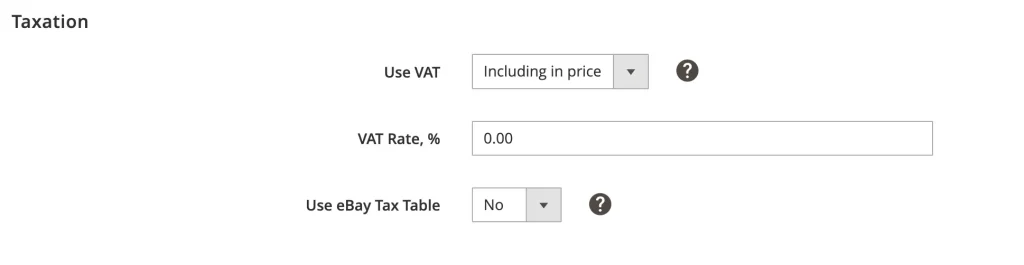
- eBay as Tax Source – M2E Pro calculates Value Added Tax according to eBay’s tax settings. You can choose whether VAT is included in the item price or added on top.
- Magento as Tax Source – Magento rules override eBay. Use this if you have custom tax rules for specific products, customer groups, or regions.
VAT included vs. excluded in price
M2E Pro handles both scenarios automatically:
- VAT Included – Tax is included in the price. A $100 product on eBay that charges 20% VAT, for example, will be imported as an order within Magento with a total of $100, and the $16.67 VAT is handled correctly.
- VAT Excluded – Value Added Tax is applied to the item price. A $100 product with 20% VAT in Magento is $120, with $20 being displayed as VAT.

This ensures that invoices, reporting, and accounting are always correct.
Here is more on eBay taxation on M2E Pro.
Currency conversion handled
Sometimes eBay orders are in a different currency than your Magento base. M2E Pro converts prices to your base currency, calculates VAT, and then converts both back to the order currency: no rounding mistakes, no manual calculations.
Automatic Magento order creation
Once you have imported the eBay order:
- The correct VAT rate is charged.
- Magento order amount is equal to eBay order.
- Your invoices are ready in compliance with the EU.
Even when the order is cross-border, M2E Pro takes care of accurate tax calculation to save you from audits, blocked listings, and customer complaints.
Pro tip: Regularly review your Selling Policy VAT settings in M2E Pro. Any updates to eBay rates are automatically applied to new orders and listings, so you stay compliant without extra work.
Cross-Border Trade with M2E and Amavat
Cross-border selling in the EU can seem complex – but it doesn’t have to be. In our latest webinar, Tomasz from Amavat explains everything sellers need to know before expanding into new EU markets.
Then, the M2E team shows how to put it all into action – managing listings, syncing tax data, automating compliance, and scaling across marketplaces from one workspace.

Conclusion: Stay Ahead of VAT Reforms
The EU Value Added Tax system is entering a new era – one built for digital trade. For online sellers, compliance is no longer a box to tick. It’s a competitive advantage.
By preparing early, automating updates, and syncing your systems, you can turn VAT reform into an opportunity – not a risk.
Stay informed, stay compliant, and keep selling with confidence.