If you sell through Amazon’s Merchant Fulfilled Network (MFN), you may have noticed new errors when listing products that contain batteries. Many sellers are seeing their uploads blocked or suppressed, even when the product details seem correct.
The reason for this is Amazon’s new compliance policy. Now MFN sellers are required to detail the information on batteries even if the product has only ordinary AA or AAA cells. This includes the type of battery, quantity, and in a few cases, weight and watt-hours.
These updates are not merely red tape. They are done to secure shipments, reduce the likelihood of hazmat issues, and place sellers in good standing for shipping. Without this information, your listings can never go live.
In this article, we’ll walk through the new requirements and how to avoid mistakes.
Amazon’s Updated Requirements for Battery Products
Amazon has recently expanded its rules for MFN listings that contain batteries. In the past, most compliance checks applied mainly to FBA shipments. Now, with the new update, starting August 25, 2025, MFN sellers must also provide detailed battery information whenever they create or update a listing.
Amazon confirmed these changes in its official update, noting that listings will be rejected if the required battery details are missing.
The rules apply to:
- Self-contained batteries and power banks
- Products with internal or rechargeable batteries (e.g., phones, toys, or gadgets)
- Products that use standalone batteries to function, but the batteries themselves aren’t included with the product
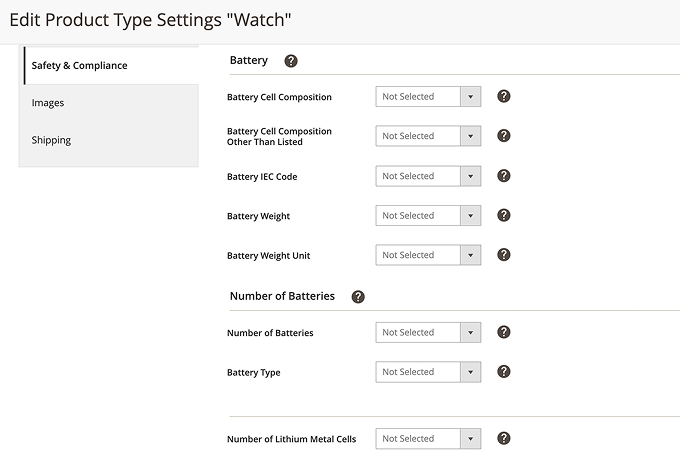
Amazon asks sellers to enter:
- Battery type (e.g., lithium-ion, alkaline, NiMH)
- Quantity of batteries in the product
- Whether batteries are included within the package
- Voltage, weight, and watt-hour rating (for rechargeable batteries)
- Extra details for lithium batteries, i.e., cell quantity or lithium weight
You are required to complete these fields so that your listing can be accepted by the API or marked as complete. That is why completing full details is now mandatory for MFN sellers.
You can also review Amazon’s full battery and product compliance guidelines to see all required attributes and documentation in detail.
Common Mistakes MFN Sellers Should Not Commit
The majority of MFN sellers are experiencing errors because they are not used to inputting battery details. The most common problems resulting in blocked or suppressed listings are the following:
- Leaving out battery characteristics – skipping out the fields will result in an error on Seller Central or through the API.
- Marking “no batteries” when batteries are required – if you need batteries to operate your item, you must indicate so, even if they’re not included in the package.
- Forgetting technical information – rechargeable items typically need voltage, watt-hour rating, or lithium content. Leaving out these, the listing will fail to activate.
- Assuming standard batteries don’t count – even simple AA or AAA batteries must be declared.
- Misclassifying products – placing a battery-powered product into the wrong category to avoid compliance checks may lead to removal.
How to Stay Compliant and Fix Listing Issues
The best way to avoid errors is to prepare the correct data before you create your listings. Start by collecting full battery details from the product manufacturer. It’s better to keep this information in one place so you can use it across all your listings.
When adding products in Seller Central, always complete the battery attribute fields. If you use bulk uploads or flat files, make sure those fields are mapped correctly. Even if you list through an integration tool, check that the required data is synced. With M2E Pro, you can map attributes directly and prevent gaps that cause API errors.
For products with lithium batteries, keep MSDS or SDS documents ready. Amazon may ask for them to confirm compliance.
If your listing was already rejected, update it with the missing attributes and resubmit. Once the fields are complete, the listing should process without issue.

Conclusion
Amazon’s new rules mean MFN sellers can no longer skip over battery details. Every product that contains or requires batteries now needs complete compliance data, from simple AA cells to complex lithium-ion packs. If you don’t provide it, your listings may be suppressed or rejected.
The good news is that staying compliant is not complicated once you prepare. Collect accurate specs from your suppliers, keep documents ready for lithium products, and make sure every listing includes the required attributes. With the proper setup, you can keep your products live and avoid costly delays.
If you use Magento, M2E Pro makes it easier to manage attributes across all your Amazon listings.